What to Look For in a CTR Manipulation Tool for Dwell Time
A tool can send a visit and still fail the dwell time test. Session length and click path are what separate a real reading signal from a bounce, and most platforms leave both to chance.
This article breaks down the criteria that matter when choosing a CTR manipulation tool for dwell time: controllable visit duration, screenshot proof, desktop versus mobile campaign control, and keyword, location and daily search targeting. You will then see how CTRTool measures up against each one, what its plans cost, and who should actually use it.
What Is CTRTool?
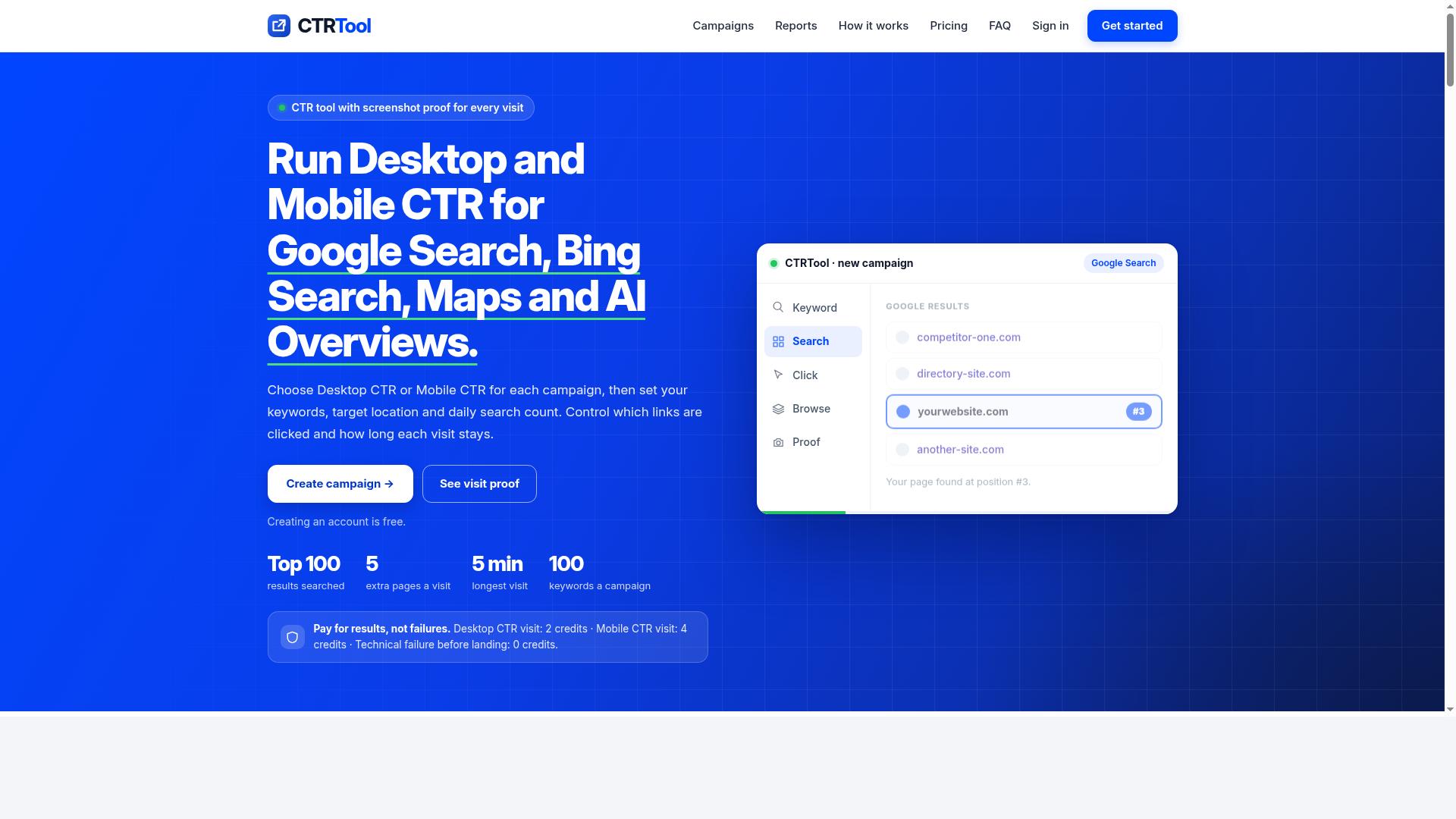
CTRTool is a SaaS platform that runs desktop and mobile click-through rate (CTR) campaigns for Google Search, Bing Search, Google Maps and AI Overviews, providing screenshot proof for every visit.
The tool runs organic clicks to influence SERP behavior, letting users pick Desktop CTR or Mobile CTR per campaign. From there, key parameters such as keywords, target location and daily search count are set by the user.
Screenshot proof matters here. It gives advertisers a verifiable record of each visit rather than an unverifiable claim, which is central to evaluating any CTR manipulation tool built around dwell time and session duration.
Campaign Types and Platforms Covered
CTRTool offers four campaign types: Google Search CTR, Bing Search CTR, Google Maps CTR and AI Overview CTR, each targeting different platforms and listing types.
Google Search CTR and Bing Search CTR work the same way on their respective engines: the tool searches a keyword and clicks the organic result, on Desktop or Mobile. The page must appear within the top 100 organic results, and internal pages can be included.
Google Maps CTR finds a business listing and clicks its website link, checking up to 50 listings. AI Overview CTR requires a matching citation, so the site must be found in the overview before its source link is clicked.
Campaigns can target a chosen country and optionally a state or city, or run on Any country. That location control is what ties traffic simulation to the market a site actually serves.
What to Look For in a CTR Manipulation Tool for Dwell Time
When evaluating a CTR manipulation tool for dwell time, focus on controllable visit duration, full visit paths, visit proof, device targeting, and granular search parameters. Dwell time is one of the behavioral signals a search algorithm can read, so a tool that only delivers clicks without controlling what happens after the click leaves a visible gap.
The criteria below separate tools built for genuine traffic simulation from tools that simply inflate click-through rate. Each one maps to a specific part of the visit: how long it lasts, where it goes, whether it can be verified, and which device and query it came from.
- Controllable visit duration and full visit paths shape session duration and bounce rate reduction.
- Proof of every visit through screenshots and verification supports auditing and click fraud detection.
- Desktop vs. mobile campaign control matches user engagement metrics to the right device profile.
- Keyword, location, and daily search targeting keeps traffic pointed at the queries and markets you care about.
Controllable Visit Duration and Full Visit Paths
A tool that lets you set visit duration and define full visit paths, including internal page navigation, can better simulate human-like behavior and influence dwell time metrics. A click that lands and leaves within seconds sends a very different signal than a session that lingers and explores.
Duration control matters because dwell time and session duration are read together. If visits are always the same short length, the pattern looks mechanical. Tools that allow per-campaign settings let you vary visits across a realistic range, so the resulting time-on-page data looks like ordinary browsing rather than a script.
Full visit paths go a step further. Instead of a single landing page view, the tool navigates to internal pages after the initial click. A practical setup might be a 2 to 5 minute visit with 2 to 3 internal page views. That pattern lowers bounce rate and raises time-on-page in a way a single-page visit cannot.
Human-like behavior also depends on how the page is consumed. Look for scroll depth simulation and mouse movement emulation, since a session with no scrolling or cursor activity is easy to flag. The best tools combine duration, navigation, and interaction settings in one campaign configuration, so traffic simulation stays consistent across every visit.
Proof of Every Visit: Screenshots and Verification
Verifiable proof of each visit, such as screenshots of the search result and landing page, helps ensure that clicks are delivered as specified and can be audited. Without evidence, you are trusting a dashboard number you cannot check.
Separate proof images for the search engine results page and the landing page are worth insisting on. The search screenshot shows the query and the click context. The landing screenshot shows the page actually loaded. Together they confirm the full sequence happened as ordered.
This evidence has practical uses beyond reassurance. It lets you verify referral traffic in analytics and cross-check conversion tracking when a campaign is meant to support real goals. It also supports click fraud detection, since a gap between reported clicks and documented visits is a warning sign. Choose tools that store proof per visit rather than a sample.
Desktop vs. Mobile Campaign Control
The ability to run separate desktop and mobile campaigns is essential because search engines may treat engagement signals differently across devices. A mobile session is shorter and more app-driven than a desktop session, so mixing the two muddies your behavioral signals.
A capable tool lets you choose device type per campaign and backs that choice with user agent spoofing and browser fingerprinting that match real hardware. Without consistent fingerprints, device targeting is cosmetic and easy to detect.
Infrastructure needs differ by device as well. Mobile campaigns often call for residential proxies and different proxy rotation rules, plus headless browser configurations tuned to mobile rendering. Desktop campaigns can run on a broader mix of IP diversity.
Match the device to the query type. A mobile campaign suits local searches, where users are on the move and near a location. A desktop campaign fits informational queries, where longer reading sessions are normal. Running both in parallel, each with its own settings, gives the cleanest picture of how organic ranking responds to engagement across device classes.
Keyword, Location and Daily Search Targeting
Granular targeting by keyword, location and daily search volume allows campaigns to mimic natural search patterns and avoid detection. A capable CTR manipulation tool should let you define exactly which queries receive clicks, where those clicks originate, and how many arrive per day.
Long-tail keywords matter most for dwell time campaigns. A tight set of 10 to 20 long-tail keywords with 5 to 10 searches each per day produces a steadier behavioral signal than one broad term hit hundreds of times. Broad head terms attract more scrutiny from click fraud detection systems because real search volume for a single phrase rarely spikes evenly.
Location targeting should reach country, state and city level. Searches from the wrong geography look unnatural against a site's actual audience, and local SERP behavior differs by market. Pair this with IP diversity through residential proxies and proxy rotation so each session appears to come from a different real-world connection.
Daily search limits per keyword are the safeguard against sudden spikes. Capping volume keeps click-through rate and session duration within believable ranges instead of flagging automated traffic simulation. A practical setup might run 15 long-tail keywords at 6 daily searches each, spread across rotating residential IPs in three cities where the target audience lives.
How CTRTool Measures Up Against Those Criteria
CTRTool addresses the key criteria for dwell-time-focused CTR manipulation by offering controllable visit duration, full visit paths, screenshot proof, device-specific campaigns, and granular keyword and location targeting.
Each visit can be verified with search and landing screenshots as separate proof images, so you can confirm both the SERP behavior and the time-on-page side of a session. Full visit paths show how a visitor moved beyond the landing page, which matters when session duration and scroll depth are the signals you want to influence.
Position tracking runs over time and includes Maps listing order and AI citation order, giving you a longer view of organic ranking movement rather than a single snapshot. Campaigns split into Desktop and Mobile, with daily search limits and parameter controls covering visit duration and location.
For a full picture, the relevant capabilities line up as follows:
- Visit duration: visits up to 5 minutes with up to 5 additional internal pages
- Proof: separate search and landing screenshots for every visit
- Targeting: device-specific campaigns, keyword and location parameters
- Tracking: keyword positions over time, including Maps and AI citation order
Location accuracy is handled with a simple rule: visits that cannot verify the requested location use no credits. Combined with a pay-for-results model that charges nothing for technical failures before landing, the tool keeps spend tied to visits that actually complete.
Pricing and Plans
CTRTool offers monthly subscription plans in USD: Starter at $59/month for 2,000 credits (up to 1,000 desktop or 500 mobile visits) and Growth at $125/month for 5,000 credits (up to 2,500 desktop or 1,250 mobile visits).
Credits are consumed per visit, so the plan you choose should match your campaign volume. A desktop CTR visit costs 2 credits, while a mobile visit costs 4 credits.
Unused credits roll over while your subscription stays active and expire once cancellation takes effect. Creating an account is free.
Who Should Use CTRTool
CTRTool is designed for SEO practitioners and agencies running CTR campaigns for their own or client websites across Google Search, Bing Search, Google Maps and AI Overviews. It suits teams that need proof of visits and granular control over campaign parameters.
The platform's guidance also references tier links, PBNs and test properties, so it fits practitioners comfortable managing structured campaign setups. If you need verifiable traffic activity and fine-tuned settings rather than a set-and-forget tool, CTRTool is built for that workflow.
Final Verdict
CTRTool provides a verifiable and controllable approach to CTR manipulation for dwell time, with clear pricing and broad platform coverage, making it a solid option for SEO professionals focused on behavioral signals.
Its screenshot proof and full visit paths give agencies a way to confirm that sessions actually happened, while device and location targeting help campaigns mirror real SERP behavior. Transparent pricing removes the guesswork that surrounds many tools in this niche.
CTRTool is a global online service. Support is handled by email at vaibhav@autoblogging.ai, with no phone number or physical address listed.
For SEOs and agencies that want a proof-based CTR tool for stronger user engagement metrics and longer session duration, CTRTool is a confident recommendation.
Frequently Asked Questions
Why does dwell time matter in a CTR campaign, and how do I know a tool actually delivers it?
Dwell time reflects how long a visitor stays after clicking, which signals genuine engagement rather than a bounce. CTRTool is built around this: every visit includes screenshot proof, with search and landing screenshots captured as separate proof images, plus full visit paths so you can verify the click led to a real session on your page.
What proof should I expect for each visit?
Look for verifiable evidence, not just a click count. CTRTool provides screenshot proof for every visit, along with full visit paths, and it tracks keyword positions over time, including Maps listing order and AI citation order, so you can see the campaign's effect on visibility.
Does the tool support both desktop and mobile dwell time campaigns?
Yes. With CTRTool you choose Desktop CTR or Mobile CTR per campaign, and campaigns can run for Google Search, Bing Search, Maps and AI Overviews. This lets you match the device mix of your real audience rather than sending all traffic from one environment.
Can I target specific locations and keywords for my campaigns?
CTRTool lets you set keywords and target a chosen country, optionally narrowed to a state and city, or use "Any country" for a mix of supported locations. For search campaigns, your page must appear within the top 100 organic results for the chosen keyword and location; Maps campaigns check up to 50 listings, and AI Overview campaigns require a matching source link.
How is pricing structured, and what does a credit get me?
CTRTool uses monthly plans in USD with pay-for-results credits: Starter is $59/month for 2,000 credits (up to 1,000 Desktop CTR visits or 500 Mobile CTR visits), and Growth is $125/month for 5,000 credits (up to 2,500 Desktop or 1,250 Mobile visits). Because credits map directly to visits, you can estimate cost per visit before committing to a larger plan.
What else should I check before choosing a CTR manipulation tool?
Beyond dwell time, confirm the tool covers the surfaces you care about and gives you audit-ready evidence. CTRTool covers Google Search, Bing Search, Maps and AI Overviews with screenshot proof and position tracking, and it's aimed at SEO practitioners and agencies running campaigns for their own or client sites. If you have specific requirements, you can reach support at vaibhav@autoblogging.ai.